How Downloads Work: Standard Downloads and Convenience Combo Kits
You may also wish to view our video tutorial on how downloadable MusicK8.com products work. 
You purchase a downloadable product as you would any other product: Click to add it to your cart, then go through the normal checkout procedure. On the Order Confirmation page, you'll find a link to your personal downloads page, where - for a limited time - you can access the files you purchased. (Downloadable magazine subscriptions work differently: see below.) They will remain available for a week. As a backup, you'll also receive an e-mail with a link to that same personal downloads page.
It is even possible to order downloadable products by phone, fax, or mail. Just be sure to include a valid e-mail address so that you receive the e-mail message containing the link to your products.
Combining Downloadable Products With Other Products
You may purchase downloadable products, downloadable subscriptions, print subscriptions, and physical products in any combination in the same order.
How To Download And Extract Your Files
Simply click the links on your personal downloads page to download your files. Be sure to download all the files: Some larger products are split into two downloads. A link to your personal download page will be sent to you by e-mail. Your personal download page will remain on our server for one week. If you have trouble downloading at first, you can try again later.
To use most files, you'll need to unzip the compressed files. (PDF files and MP4 video files do not need to be unzipped.) The file may expand automatically. If not, double-click the file to unzip or extract it. If that doesn't work, open your program of choice first, select expand, and then navigate to the file you downloaded.
Windows desktop/laptop users have built-in software: Simply double-click the zipped file, then choose the Extract All option.
Mac desktop/laptop users also have built-in software: Simply double-click the zipped file to unzip it.
You can also download extraction software, if you prefer. Simply search for "zip extractor" in your favorite search engine, and you'll find several free options.
Accessing From Your Mobile Device
- On Apple devices, you may need a special app to unzip Zip files and access your downloadable product or magazine component. If you don't already have one installed, download an app from the app store. Once in the app store, just search for "zip." There are several options, and most are free.
- Click the link for the downloadable file in Safari, and a screen should pop up showing the Zip file.
- In the upper right corner of Safari, text should give you the option to open the file in whatever Zip app you downloaded. Click on that text.
- The app you downloaded should open asking if you want to extract or unzip the downloadable files. Select "yes," and all of your files should be accessible (e.g., MP3s, PDFs, etc.).
- You may also need an app to read the PDF, if you don't have one installed. Search the app store for "pdf" to find free options.
If you're using a non-Apple device, the same basic instructions apply. Check the app store for your particular device.
Connection Times Out/Downloaded File Is Incomplete
These files can be very large; your download may have been interrupted. Consider using a school computer with a high-speed connection, or ask a friend to let you use his/her computer to download the file. If you have the link to your download page, you can connect from any computer. Remember that your download page is deleted after one week.
Didn't Get An E-mail?
Spam-blocking software will sometimes misinterpret order confirmations and other e-mails as Spam. In your e-mail software application, specify that e-mails sent from site@musick8.com are not Spam.
Can't Find Your File?
If you can't find the file you just downloaded, you can search for it. The name of the file is the SKU or product number + .zip. The SKU is listed on your confirmation e-mail. If, for example, you ordered SBF-117, then the file will be called SBF-117.zip. Larger products may be comprised of two compressed files, in which case the second part would be called SBF-117-2.zip.
Still Can't Download Your File? Contact Us.
If you are unable to download your files, contact the web department through the Contact Us page. Remember that you must download the files within seven days of your purchase or they will no longer be available, so contact us as soon as possible.
Make A Backup
We strongly suggest you make a backup of your files for safe-keeping and keep them in a different location than the originals. You may want to burn a copy to a CD or keep them on an external disk or drive or portable device. There is a replacement fee equal to 50% of the original price for each downloadable product if you need a new copy after your personal downloads page has expired.
Downloadable Magazines
View our tutorial video about accessing your downloadable Music K-8 subscription.
Please note:
- Downloadable magazines from the current school year are not instantly accessible after purchase. Please allow a minimum of one business day for your order to be processed.
- You MUST mark messages from site@musick8.com as not being Spam; otherwise, you will not receive account e-mails from us when your account is created, when a new issue is available, or when your password is reset. Adding site@musick8.com to your address book should do the trick.
- Please DO NOT CREATE A NEW ACCOUNT if you are a NEW TEACHER at a school with an existing account, if you SWITCHED SCHOOLS, or if you SWITCHED E-MAIL addresses. The new account will NOT be properly linked to your current and previous subscriptions. Instead, update the existing account with your new username (click the "Change Account Info" button when logged in). If you can't log in or need help, call Customer Service at 1-800-437-0832 to update the account.
How to access your downloadable magazine subscription:
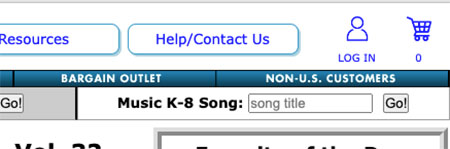 Go to the Plank Road Publishing Account Log In page. (If you didn't have an account when you purchased the downloadable magazine, one was created for you when the order was processed, and an e-mail was sent to your billing e-mail address. Check that e-mail for login instructions.)
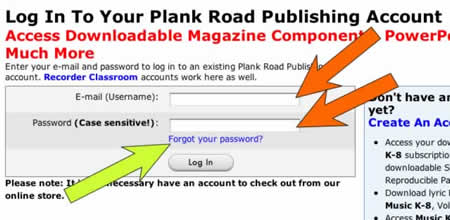 Enter your login information (orange arrows). [If you've forgotten your password, click on the "Forgot your password?" link and fill out the form (yellow-green arrow). A temporary password will be sent to you via e-mail.]
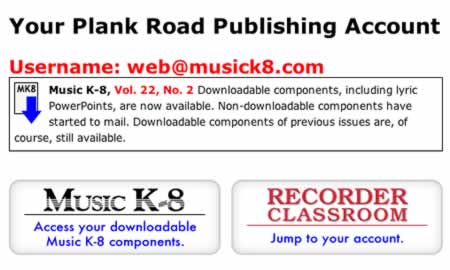 Once you are logged in, click the button for the magazine you are interested in downloading. (The buttons are only clickable if you are a subscriber to that magazine.)
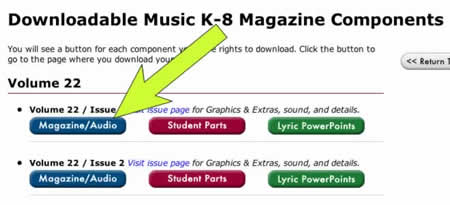 If you clicked on the Music K-8 button, the next page will look similar to the screenshot below. (Buttons are only visible if your magazine subscription includes that particular option.) Click on the "Magazine/Audio" button for the issue you are interested in downloading.
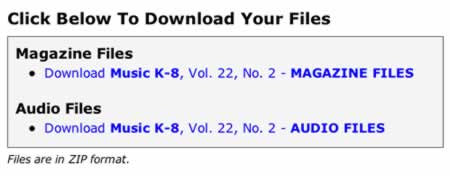 On the following page, click on the link "Download Music K-8, Vol. XX, No. X." There will be one link for the magazine files and one link for the audio files. On the next page, click on the "Continue" button after each download is finished. These are VERY LARGE files, so please be patient.